Aiida
Aiida is a great tool for managing computational tasks. And it can also be used in high-thoughput computing.
I started learn how to use Aiida in November, 2020, and it suddenly release my burden on how to manage computational tasks. Before Aiida, all the management are done by using folders, which can be really inefficient and chaotic, but with Aiida, I can put everything in one jupyter notebook, then manage all the work, the connection to the supercomputer and also the database in one place.
I have written two tutorial articles about how to install and configure Aiida on Ubuntu and macOS, since I have a Mac, so on macOS could be a better choice since the virtual machine is not as efficient as the main OS.
When we try to learn Aiida or other programming frameworks, the first thing is always: get a demo running. Because you can learn a lot of things by trial-and-error
Some common mistakes in using Aiida
In here are some mistakes that I have been experienced:
aiida.common.exceptions.MissingEntryPointError: Entry point ‘quantumespresso.pw’ not found in group ‘aiida.parsers’.
You need to check these things below:
Whether you have the parser in
aiida.parsers, you can check that by typing:verdi plugin list aiida.parsers, ifquantumespresso.pwis in, then you are OK for this check. If not, then you need to typereentry scanand re-check again.If the first step is checked, then you should restart the daemon:
verdi daemon restart --reset, because the daemon may not have the information on the parser.
For detailed information, please see this
Write aiida plugins
In Aiida, I think the most important and most interesting concept is “plugins”, which can extend the capability of aiida-core, also give the user more freedom to create their own workflow in order to make the work more engaging and interesting (offload all the boring stuff).
But writing aiida plugin is not that straight forward, I’m learning that right now. But reading without thinking is bad, and what better way to think than just writing about one’s thought, that’s why I’m writing all my thoughts in here in order to help me understand more about the structure of aiida-core and how everything connects together. Let’s begin!
If we take a look at the aiida-quantumespresso, we will see that the structure is:
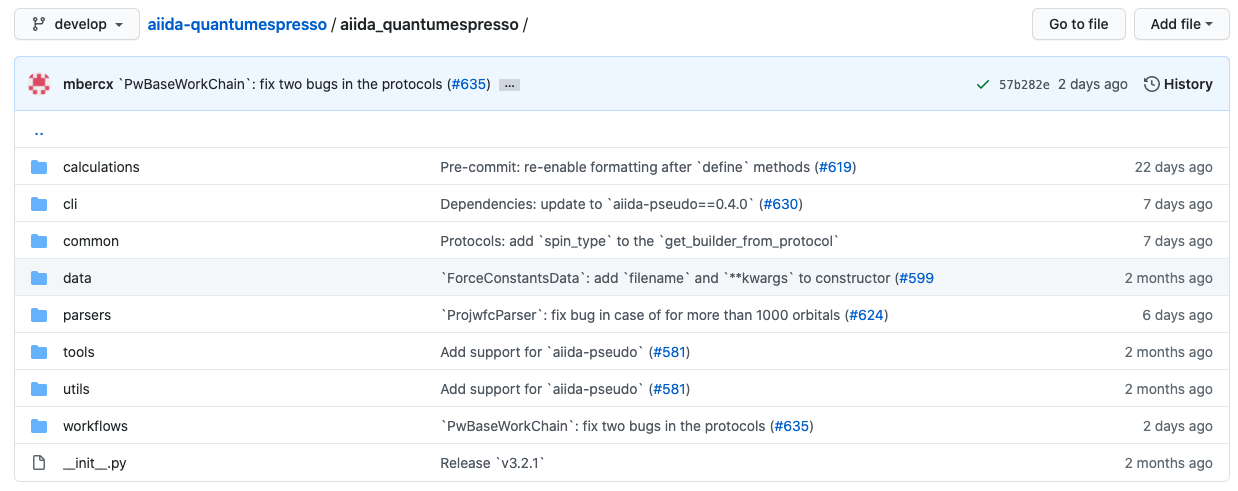
Screenshot of the structure of aiida_quantumespresso plugins
the most important folders are: calculations, parsers and workflows, others are supplementary.
So if we want to write the aiida plugins by ourselves, we need to be able to:
Write the calculations for a specific external program (e.g. VASP, CPMD, CP2K, Quantum Espresso, etc.)
Write the parser for the results
Write the workflows and workchains (workchain is future, so our main effort will be on writing workchain, but we will also talk about how to write the workflow and what’s the difference between them. In Aiida’s official website they have a really good explanation, but I want to have my own version of that.)
Write the calculation
We should start with how to write the calculation. In order to do that we need to know what a calculation actually means in Aiida. So in aiida, The father class of all calculations is this class: aiida.engine.CalcJob, so in order to write a calculation, we need to inherit from this class, something like:
from aiida.engine import CalcJob

class somethingCalculation(CalcJob):
In this CalcJob class, we need to define two functions: (1) define() (2) prepare_for_submission(). The first function (define()) is used for declaring all the inputs, outputs, error messages that can happen during the calculation, and the second function (prepare_for_submission()) is used for preparing all the input files and submit to the queue, managed by daemon (we will talk about that later).
Ok, now let’s try to write the define() function, in here I give an example (from aiida official website), and try to explain it line by line, because that’s how you learn programming, but reading other people’s code and try to explain to others like you wrote them (even though you are not). That’s Feynman technique.
Our define() function is like in below:
from aiida import orm
from aiida.engine import CalcJob, CalcJobProcessSpec

class hzdCalculation(CalcJob):
    @classmethod
    def define(cls, spec:CalcJobProcessSpec):
        super().define(spec)

        # input parameter example
        spec.input('x', valid_type=(orm.Int, orm.Float), required=True, default=1, help='This is our first variable')

        # output parameter example
        spec.output('output', validtype=(orm.Int, orm.Float), help='This is the output of this calculation.')

        # output some error messages
        spec.exit_code(666, 'EVIL_IS_COMING', message='This is my first error message.')

        # set the default parser
        spec.inputs['metadata']['options']['parser_name'].default = 'parser_name'
This is a super simple way to define the define() function. We should look at it line by line and try to explain everything that is happening right now:
from aiida import orm
orm is the module in python which contains all aiida-specific types, you can only keep provenance in aiida if you use the type that they have provided, and there are lots of them, you can see that in the figure below:
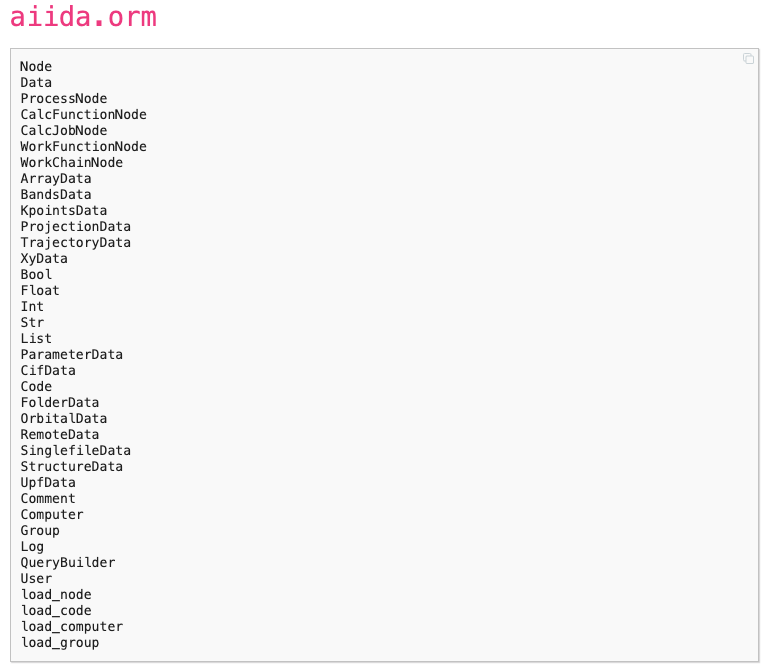
types in aiida.orm module
There are some usual types (e.g. int, float) and other special types (e.g. FolderData, StructureData, etc.), but if you want to keep provenance in your calculation (which is recommended by the Aiida), you should use the types provided by aiida.
from aiida.engine import CalcJob, CalcJobProcessSpec
We know that the CalcJob is the father class of the our calculation class, but we need to understand more about the CalcJobProcessSpec. This is the class for spec in our code, if you want to learn more about it, please refer to this website
class hzdCalculation(CalcJob):
This line is really simple, we define a new class called hzdCalculation, and this class is inherited from CalcJob.
@classmethodis the decorator of a class function. A class function is only defined in the class, the object generated by the class cannot access them. If you want to learn more about decorator, please refer to my tutorial on python in computerlanguages section.def define(cls, spec:CalcJobProcessSpec):
This line define the function define(), the cls is common practice in python while defining a class function. The type of the spec is CalcJobProcessSpec, basically you can think about it as an dictionary. Well, a class is just like a type, but with more functionalities (methods in the class). Thats the essence of OOP, it is just a way of organizing your code. For simplicity we can just write: define(cls, spec).
super().define(spec)
The super() means the father class (in this case it is the CalcJob class). Then we use the class method define(spec).
spec.input('x', valid_type=(orm.Int, orm.Float), help='This is our first variable')
This is the declaration of the input parameters in the hzdCalculation. x is the name of this input, valid_type is the valid type of this variable, and help is the meaning of this variable. If required is not mentioned, then this variable is required, otherwise we should set required=False, which means this parameter is not required.
You can define lots of input parameters by using this statement. In the CalcJob class, if you look at the source code), there are many variables have been pre-defined:
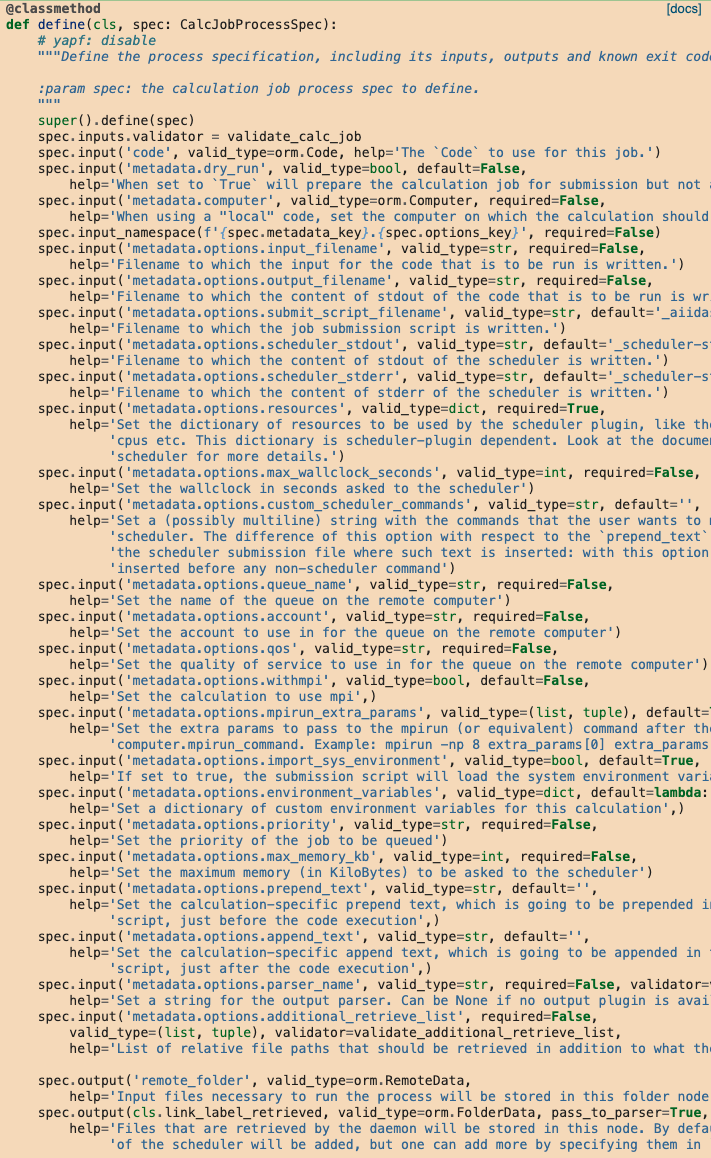
All the pre-defined parameters that we could access in the calculation class.
We can see that some variable is named: metadata.options.resources, that means that we can add hierarchy to the input parameters, for example when we want to build a PwCalculation job, then sometimes we will write something like this:
codename = 'hzd_code'
code = Code.get_from_string(codename)
builder = code.get_builder()

builder.structure = structure
builder.metadata.options.resources = {'num_machines': 2}
So the input you define in the hzdCalculation class will be given by the builder when you try to use it, understand this connection is very important.
The output parameters and the error message is almost the same as the input parameters, so we do not need to explain them more. As for the error message, Aiida has its own rules, which you can see it in the website.
Now we have done writing the define(cls, spec) functions, now let’s move on to the prepare_for_submission() function.
A really simple example is given in below:
def prepare_for_submission(self, folder: Folder) -> CalcInfo:
    with folder.open(self.options.input_filename, 'w', encoding='utf8') as handle:
        handle.write(something)

    codeinfo = CodeInfo()
    codeinfo.code_uuid = self.inputs.code.uuid
    codeinfo.stdin_name = self.options.input_filename
    codeinfo.stdout_name = self.options.output_filename

    calcinfo = CalcInfo()
    calcinfo.codes_info = [codeinfo]
    calcinfo.retrieve_list = [self.options.output_filename]

    return calcinfo
According to the aiida website, prepare_for_submission() functions has two jobs: (1) creating the input files in the format that the external code expects (2) returning a CalcInfo object that contains instructions for the Aiida engine about how the code should be run.
prepare_for_submission() function is implemented from scratch, so there is no super() method.Write the Parser
When we finished the simulation, we want to get as much information as possible for our analysis. So writing the parser for the output files is very important for Aiida. In this section we will talk about how to write a parser.
Like writing a calculation, writing a parser has to inherit from Parser class, so the class declaration can be written as:
class hzdParser(Parser):
And a more detailed (but simple) implementation is listed in below:
class hzdParser(Parser):

    def parse(self, **kwargs):

        output_folder = self.retrived
        with output_folder.open(self.node.get_option('output_filename', 'r')) as handle:
            results = handle.read()

        self.out('output', someValue)
Add entry points
For any Aiida plugins, we need to define the entry points, in this way Aiida will know which class it needs to call. Also entry point is a great way for simplifying the input. We need to define it in the setup.py file in our package. And we should writing some like:
from setuptools import setup

setup(
    name='aiida-hzd',
    packages=['aiida_hzd'],
    entry_points={
        'aiida.calculations': ['hzdCalculation = aiida_hzd.calculations:hzdCalculation'],
        'aiida.parsers': ['hzdParser = aiida_hzd.parsers:hzdParser'],
    }
)
Then your plugin should be Ok, once you install the plugin, you should do the reentry scan again to make sure that all the calculations, parsers, workflow and workchains are all implemented.
Write the workfunction and workchain
For now we know how to write the calculation and the parser, then we should move to more advanced stuff, meaning the workflow and workchain. The difference between workfunction and workchain is that: workfunction can only be run, but workchain can be submit to the daemon in order to run in the background (or on the remote server).
For the workfunction, you can treat it as a set of @calcfunction, so that the provenance can be kept. But for the workchain, I think we need to analyze the code in aiida_quantumespresso. After analyzing their code, I think we will be able to write our own workchains and combine different workchains to create more complex workflows.
The source code can be found in here. We will start with the basic one: base.py
from ..protocols.utils import ProtocolMixin
# The ProtocolMixin is the class defined in `workflows/protocols/utils.py`, I'm not quite sure about the function of this class yet.

PwCalculation = CalculationFactory('quantumespresso.pw')
# Build the calculation. How to write the calculation has been discussed in above.

class PwBaseWorkChain(ProtocolMixin, BaseRestartWorkChain):
"""Workchain to run a Quantum ESPRESSO pw.x calculation with automated error handling and restarts."""
# PwBaseWorkChain is the basic workchain, The BaseRestartWorkChain is defined in aiida-core, which we will not go into the detail this time, but in the future I hope we will.

# pylint: disable=too-many-public-methods

_process_class = PwCalculation # only appear once here, don't know the function

defaults = AttributeDict({
    'qe': qe_defaults,
    'delta_threshold_degauss': 30,
    'delta_factor_degauss': 0.1,
    'delta_factor_mixing_beta': 0.8,
    'delta_factor_max_seconds': 0.95,
    'delta_factor_nbnd': 0.05,
    'delta_minimum_nbnd': 4,
})
# default value for the parameters.

@classmethod
def define(cls, spec):
# same as calculation. This is just the structure for the Process in aiida-core.
    """Define the process specification."""
    # yapf: disable
    super().define(spec)
    # the initialization of the define function in the parent class (in this case it would be BaseRestartWorkChain class)
    spec.expose_inputs(PwCalculation, namespace='pw', exclude=('kpoints',))
    spec.input('pw.metadata.options.resources', valid_type=dict, required=False)
    spec.input('kpoints', valid_type=orm.KpointsData, required=False,
        help='An explicit k-points list or mesh. Either this or `kpoints_distance` has to be provided.')
    spec.input('kpoints_distance', valid_type=orm.Float, required=False,
        help='The minimum desired distance in 1/Å between k-points in reciprocal space. The explicit k-points will '
             'be generated automatically by a calculation function based on the input structure.')
    spec.input('kpoints_force_parity', valid_type=orm.Bool, required=False,
        help='Optional input when constructing the k-points based on a desired `kpoints_distance`. Setting this to '
             '`True` will force the k-point mesh to have an even number of points along each lattice vector except '
             'for any non-periodic directions.')
    spec.input('pseudo_family', valid_type=orm.Str, required=False, validator=validate_pseudo_family,
        help='[Deprecated: use `pw.pseudos` instead] An alternative to specifying the pseudo potentials manually in'
             ' `pseudos`: one can specify the name of an existing pseudo potential family and the work chain will '
             'generate the pseudos automatically based on the input structure.')
    spec.input('automatic_parallelization', valid_type=orm.Dict, required=False,
        help='When defined, the work chain will first launch an initialization calculation to determine the '
             'dimensions of the problem, and based on this it will try to set optimal parallelization flags.')

    spec.outline(
        cls.setup,
        cls.validate_parameters,
        cls.validate_kpoints,
        cls.validate_pseudos,
        cls.validate_resources,
        if_(cls.should_run_init)(
            cls.validate_init_inputs,
            cls.run_init,
            cls.inspect_init,
        ),
        while_(cls.should_run_process)(
            cls.prepare_process,
            cls.run_process,
            cls.inspect_process,
        ),
        cls.results,
    )

    spec.expose_outputs(PwCalculation)
    spec.output('automatic_parallelization', valid_type=orm.Dict, required=False,
        help='The results of the automatic parallelization analysis if performed.')

    spec.exit_code(201, 'ERROR_INVALID_INPUT_PSEUDO_POTENTIALS',
        message='The explicit `pseudos` or `pseudo_family` could not be used to get the necessary pseudos.')
    spec.exit_code(202, 'ERROR_INVALID_INPUT_KPOINTS',
        message='Neither the `kpoints` nor the `kpoints_distance` input was specified.')
    spec.exit_code(203, 'ERROR_INVALID_INPUT_RESOURCES',
        message='Neither the `options` nor `automatic_parallelization` input was specified.')
    spec.exit_code(204, 'ERROR_INVALID_INPUT_RESOURCES_UNDERSPECIFIED',
        message='The `metadata.options` did not specify both `resources.num_machines` and `max_wallclock_seconds`.')
    spec.exit_code(210, 'ERROR_INVALID_INPUT_AUTOMATIC_PARALLELIZATION_MISSING_KEY',
        message='Required key for `automatic_parallelization` was not specified.')
    spec.exit_code(211, 'ERROR_INVALID_INPUT_AUTOMATIC_PARALLELIZATION_UNRECOGNIZED_KEY',
        message='Unrecognized keys were specified for `automatic_parallelization`.')
    spec.exit_code(300, 'ERROR_UNRECOVERABLE_FAILURE',
        message='The calculation failed with an unidentified unrecoverable error.')
    spec.exit_code(310, 'ERROR_KNOWN_UNRECOVERABLE_FAILURE',
        message='The calculation failed with a known unrecoverable error.')
    spec.exit_code(320, 'ERROR_INITIALIZATION_CALCULATION_FAILED',
        message='The initialization calculation failed.')
    spec.exit_code(501, 'ERROR_IONIC_CONVERGENCE_REACHED_EXCEPT_IN_FINAL_SCF',
        message='Then ionic minimization cycle converged but the thresholds are exceeded in the final SCF.')
    # yapf: enable
Now let’s analyze this code, and learn how to write a WorkChain.
Take a look at spec.expose_inputs(PwCalculation, namespace='pw', exclude=('kpoints',))
This is a very, very important statement. Because in this way we can connect different calculations and workchains together.
In order to understand this command, we need to understand the meaning of namespace, and this is the key in our input parameters of the workchain.
When we submit a workchain, we need to use this command: chainNode = submit(hzdWorkChain, **inputs), where in the inputs (dictionary), you can write:
inputs = {
    'pw': {
        'CONTROL': {},
        'SYSTEM': {},
        'ELECTRONS': {}
    }
}
So that our workchain will know if in input there is a key called pw, then I should assign the parameter in that key to PwCalculation.
Other spec.input commands are not very interesting because we have already discussed them during the writing of calculation.
Then another import part of the WorkFunction is spec.outline():
spec.outline(
    cls.setup,
    cls.validate_parameters,
    cls.validate_kpoints,
    cls.validate_pseudos,
    cls.validate_resources,
    if_(cls.should_run_init)(
        cls.validate_init_inputs,
        cls.run_init,
        cls.inspect_init,
    ),
    while_(cls.should_run_process)(
        cls.prepare_process,
        cls.run_process,
        cls.inspect_process,
    ),
    cls.results,
)
spec.outline() function will define the logic of your workchain, bascially means the flow of your calculation. For example, if I want to calculate the PDOS of certain system, the procedure is like this:
Run the geometric optimization calculation (
relax/vc-relax) on the system in order to get the optimized structure.Run the
scfcalculation on the optimized structure to get the wavefunction and charge density.Run the
nscfcalculation with denser k-point meshes.Run the
projwfc.xcode to get the projected density of states (PDOS)
This is the logic, if we want to apply them in the workfunction, then our spec.outline() could be written like this:
spec.outline(
    cls.relax,
    cls.scf,
    cls.nscf,
    cls.projwfc
)
But the classfunction (cls.relax etc.) needs to be written later, we will talk about how to write these functions later.
For the output part, since we can use spec.expose_inputs() to simplify the code, we can also expose the output of certain calculation / workchain by using spec.expose_outputs(). Just like the author did in this statement:
spec.expose_outputs(PwCalculation). Other outputs can be defined by spec.output().
Then the exit_code part is not that interesting either, it is just manual work of showing all kinds of error messages and suggestions about how to deal with them. I think what’s more important right now is to learn how to write the classmethods in the spec.outline(), this is the heart of workchain.
cls.setup
First we will look at cls.setup, its source code is like:
def setup(self):
    """Call the `setup` of the `BaseRestartWorkChain` and then create the inputs dictionary in `self.ctx.inputs`.
    This `self.ctx.inputs` dictionary will be used by the `BaseRestartWorkChain` to submit the calculations in the
    internal loop.
    """
    super().setup()
    self.ctx.restart_calc = None
    self.ctx.inputs = AttributeDict(self.exposed_inputs(PwCalculation, 'pw'))
The cls.setup function can setup the PwCalculation parameters. First it will initialize from the parent class BaseRestartWorkChain (denoted as super()). Then we see a variable named self.ctx.restart_calc, what is this self.ctx mean? You can think about this as a object property, where you can access the input of the workchain by calling self.ctx.inputs. If you assign a namespace in the spec.expose_inputs (like in this case the namespace for PwCalculation is pw), so you can assign all the inputs from PwCalculation to workchain by this command:
self.ctx.inputs = AttributeDict(self.exposed_inputs(PwCalculation, 'pw'))
Then there are some validation processes, which is important, but you can skip them (if you trust your own input and don’t want the code tell you what to put).
cls.should_run_init
The source code of cls.should_run_init() is:
def should_run_init(self):
    """Return whether an initialization calculation should be run.
    :return: boolean, `True` if `automatic_parallelization` was specified in the inputs, `False` otherwise.
    """
    return 'automatic_parallelization' in self.inputs
So it is really simple: if automatic_parallelization tag is in self.inputs, then return True, otherwise return False.
But what’s interesting here is that now we have two different ways to write input parameter: (1) self.input and (2) self.ctx.input. What’s the difference between them? (Not so sure right now, but I’m going to find out)
cls.run_init
The source code of cls.run_init() is:
def run_init(self):
    """Run an initialization `PwCalculation` that will exit after the preamble.
    In the preamble, all the relevant dimensions of the problem are computed which allows us to make an estimate of
    the required resources and what parallelization flags need to be set.
    """
    inputs = self.ctx.inputs

    # Set the initialization flag and the initial default options
    inputs.settings['ONLY_INITIALIZATION'] = True
    inputs.metadata['options'] = update_mapping(inputs.metadata['options'], get_default_options())

    # Prepare the final input dictionary
    inputs = prepare_process_inputs(PwCalculation, inputs)
    running = self.submit(PwCalculation, **inputs)

    self.report(f'launching initialization {running.pk}<{self.ctx.process_name}>')

    return ToContext(calculation_init=running)
How to run workchain
The procedure for submitting the workfunction can be written as:
from aiida.engine import submit
from aiida.plugins import WorkflowFactory

hzdWorkChain = WorkflowFactory('hzdWorkChain_entrypoint')
inputs = {
    # the input file for our workchain
}

workchain_node = submit(hzdWorkChain, **inputs)
Another way is to use the get_builder() methods just like the CalcJob:
from aiida.plugins import WorkflowFactory

hzdWorkChain = WorkflowFactory('hzdWorkChain_entrypoint')
builder = hzdWorkChain.get_builder()

# Then we should use builder to assign the parameters

workchain_node = submit(builder)
Of course we can combine together different workchains to create more advanced and more complicated workchains, and this is really important for more complex workflow in computational material science.
The reason why most of aiida plugins are similar is due to the reason that the base for aiida-core is called plumpy
Input parameters for aiida_quantumespresso workchain
Since there are no documentations on the input parameters of aiida_quantumespresso workchain, so I have provide my own version of input in below. All the input files are tested and work fine.
For PwBaseWorkChain
The example script is shown in below, the parameters are in the input file:
from aiida.plugins import WorkflowFactory
from aiida.orm import KpointsData, Code, Dict, UpfData
from aiida.engine import submit

from hzdplugins.structure.build import bulkFromString
from hzdplugins.aiidaplugins.info import viewStructure

PwWorkChain = WorkflowFactory('quantumespresso.pw.base')

Pt_bulk = bulkFromString('Pt', 'fcc', 3.98, cubic=True, supercell=[1, 1, 1])

kpts = KpointsData()
kpts.set_kpoints_mesh([8.0, 8.0, 8.0])

inputs = {
'pw': {
    'code': Code().get_from_string('pw.x-6.5-rwth-claix-mac@rwth-claix-mac'),
    'structure': Pt_bulk,
    'pseudos': {'Pt': UpfData('/Users/z.he/Documents/google-drive/aiida/python/'+'Pt.pbesol-spfn-rrkjus_psl.1.0.0.UPF')},
    'parameters': Dict(dict = {
        'CONTROL': {
            'calculation': 'vc-relax',
            'max_seconds': 86000,
            'restart_mode': 'from_scratch',
            'wf_collect': True,
            'nstep': 50000,
            'tstress': True,
            'tprnfor': True,
            'etot_conv_thr': 1e-06,
            'forc_conv_thr': 0.001,
            'disk_io': 'low',
            'verbosity': 'low'
        },
        'SYSTEM': {
            'ibrav': 0,
            'nosym': False,
            'ecutwfc': 50.0,
            'ecutrho': 500.0,
            'occupations': 'smearing',
            'degauss': 0.002,
            'smearing': 'gaussian',
            'input_dft': 'PBESOL'
        },
        'ELECTRONS': {
            'electron_maxstep': 200,
            'conv_thr': 1.0e-6,
            'diagonalization': 'david',
            'mixing_mode': 'plain',
            'mixing_beta': 0.3,
            'mixing_ndim': 10
        }
    }),
    'settings': Dict(dict={
        'cmdline': ['-nk', '4']
    }),
    'metadata': {
        'label': 'WorkChain_Trial_1',
        'description': 'Trial on the workchain',
        'options': {
            'resources': {'num_machines': 2},  # on rwth_claix, each node has 48 cores.
            'max_wallclock_seconds': 86400,
            'account': 'jara0037',
            'scheduler_stderr': 'stderr',
            'scheduler_stdout': 'stdout',
            'queue_name': 'c18m'
        }
    }
},
'kpoints': kpts
}

calcWorkChain = submit(PwWorkChain, **inputs)
calcWorkChain.uuid